 Skip to content
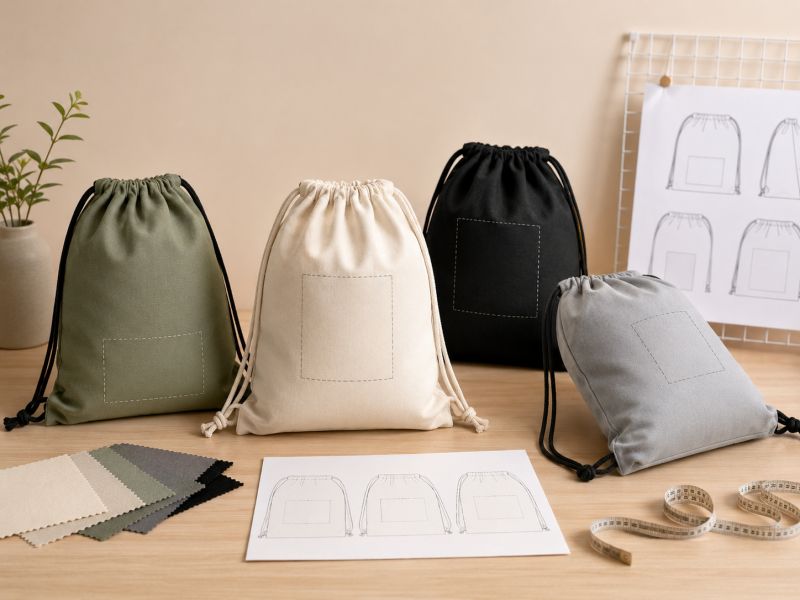
The safest logo placement on most custom drawstring bags is the front-center area below the drawstring channel, with enough space from side seams, bottom corners, and strong wrinkle zones. This position keeps the logo visible when the bag is flat, filled, carried, and cinched. It also helps reduce distortion during printing, packing, and daily use.
A drawstring bag is a moving product. It is pulled closed, carried by cords, filled with items, folded in cartons, and sometimes worn on the back. A logo that looks perfectly centered on a flat mockup may shift visually when the bag is used.
That is why a safe logo area should be planned from the actual bag structure, not only from a design file. The top drawstring channel is not stable. The side seams can pull the fabric. Bottom corners take stress when the bag holds weight. A good logo position avoids these zones and sits in a balanced area that still looks clean after movement.
For standard drawstring backpacks, the front-center area is usually the most practical choice. For small pouches, the logo may need to be smaller and simpler. For large sport sacks, the logo can be wider, but still needs margins from seams and the top closure.
Where Is The Best Position To Print A Logo?
For most drawstring bags, the best logo position is centered on the front panel, slightly below the top drawstring channel. This area usually gives the best balance between visibility, clean printing, and real-use stability.
A logo placed too high may be affected by the cinch area. A logo placed too low may be less visible when the bag is carried. A logo placed too close to the side seam may look off-center once the bag is filled. A logo placed near the bottom corners may be affected by stress, folding, or packing pressure.
A good rule is simple: keep the logo where the fabric stays the flattest.
Why Should Logos Stay Below The Drawstring Channel?
The drawstring channel gathers fabric when the bag closes. If a logo sits too close to this area, the top of the print may wrinkle, bend, or disappear into the folds. Even if the logo looks good when the bag is open, it may look distorted when the drawcord is pulled.
This is especially important for brand merchandise, where the logo is part of the product value. A small placement adjustment can make the difference between a polished merchandise item and a rushed giveaway.
How To Avoid Logo Distortion When Cinching The Bag?
To reduce logo distortion, place the artwork below the drawstring channel, keep enough top margin, avoid very tall graphics, and check the logo on a filled and closed sample. The logo should still look balanced when the bag is not lying flat.
Artwork shape matters too. A wide horizontal logo often works better than a tall vertical graphic on standard drawstring bags. If the brand mark is tall, it may need to be scaled down or paired with a smaller wordmark.
For full-front graphics, the sample should be checked carefully after the bag is pulled closed. Large graphics can work, but they need more planning than a simple centered logo.
How Large Should The Print Area Be?

The print area should be large enough for clear brand visibility but small enough to stay inside the stable fabric zone. On a standard drawstring bag, the safest print area is usually the central front panel, below the drawstring channel and away from seams and corners. Exact size depends on bag dimensions, fabric, logo method, artwork detail, and sample result.
Many teams ask for the largest possible logo. That is understandable. A bigger logo seems easier to see. But on a soft bag, maximum size is not always the best size.
A strong merchandise bag often uses smart proportion rather than oversized artwork. A balanced logo with breathing space can feel more premium than a print that fills the whole front. This is especially true for retail gifts, fan merchandise, club products, school stores, and event collections.
The print area should also match the print method. Screen printing can handle many simple logos well. DTF or heat transfer may suit more detailed artwork. Embroidery needs more space and fabric stability. A woven label or patch may look better when the artwork is small but brand detail matters.
What Is The Maximum Print Size For Standard Bags?
The maximum print size for a standard drawstring bag depends on the actual bag size, top channel height, side seam allowance, bottom corner construction, and print method. A common safe approach is to keep the logo inside the central flat front panel and leave clear margins around all stress or fold areas.
For a typical drawstring backpack, the printable area may look wide when flat, but the safe logo area is smaller than the whole front. If the logo must be large, it should be tested on a sample with the bag filled and pulled closed.
A factory should not confirm only by saying “large print area available.” The real is: large enough for the design, yet still stable in production and use?
Why Is The Full Front Panel Not Always A Safe Print Area?
The full front panel includes areas that move, fold, stretch, or take stress. The top area gathers when cinched. Side areas may curve when the bag is filled. Bottom corners may crease or carry load. If a logo extends too close to these areas, it can look distorted or inconsistent.
This is why the safe print area is usually smaller than the visible front panel. A clean central print is often more effective than a graphic pushed too close to every edge.
Full-panel printing can still be reviewed for certain projects, but it needs separate artwork planning, material review, sample testing, and tolerance control.
How Do Small, Standard, And Large Bags Change Logo Size?
Small drawstring pouches need smaller logos, simpler artwork, and more careful line thickness. Standard drawstring backpacks can usually carry a front-center logo, event name, school mark, or brand symbol. Large sport sacks can support wider graphics, but the print still needs margins from the drawcord area and seams.
Logo size should scale with the bag, not with the design file. A 20 cm wide logo may look strong on a large sports bag but crowded on a small pouch. A tiny logo may look premium on cotton merchandise but too weak on a large event sack.
If a collection includes multiple sizes, each size should have its own logo placement review.
How Do Bag Size And Structure Affect Logo Position?
Bag size and structure affect logo position because drawstring bags are not fixed flat surfaces. Seams, bottom corners, front pockets, zipper panels, mesh sections, folded packing lines, and carry shape can all reduce the safe print area. A good logo layout should consider how the bag looks flat, filled, folded, closed, and worn.
The same logo cannot always be copied from one bag type to another. A simple flat non-woven bag, a 210D polyester sport sack, a cotton canvas pouch, and a mesh drawstring bag all behave differently.
Structure should guide the print area. If there is a front pocket, the logo may sit on the pocket or above it. If there is a zipper, the print needs to avoid thick seams. If there is mesh, the logo may need a solid patch. If the bottom corners are reinforced, the logo should not compete with those stress areas.
A practical logo layout respects the bag as a real object.
How Do Seams, Corners, And Bottom Stress Areas Limit Printing?
Seams create uneven thickness. Bottom corners carry stress when the bag holds weight. These areas can affect print alignment, adhesion, smoothness, and long-term appearance.
A logo printed too close to a side seam may look crooked once sewn. A graphic near the bottom corner may crease during packing or stretch when loaded. Keeping enough margin from these areas helps protect both the visual effect and the production consistency.
For bulk orders, this matters even more. A small placement issue on one sample may repeat across thousands of pieces.
Do Front Pockets, Zippers, Or Panels Change The Print Area?
Yes. Front pockets, zippers, stitch lines, panel seams, reflective strips, mesh inserts, and contrast panels all change the usable print area. They can create useful branding zones, but they can also limit logo size.
A front pocket may be a good logo location if the pocket is flat enough. A zipper area may not be suitable for direct printing. A contrast fabric panel can help the logo stand out, but the placement needs to match the sewing lines.
When the bag has extra structure, the artwork should be reviewed with the pattern, not only with a photo.
How Does The Bag Look When Filled, Folded, And Carried?
A drawstring bag looks different in three states: flat on a table, filled with items, and carried by cords. Logo placement should be checked in all three.
When filled, the front panel may curve. When folded, the print may receive pressure. When carried, the top gathers and the body hangs differently. If the logo still looks centered, clear, and balanced in these states, the placement is much safer.
This is one reason a physical sample matters for merchandise projects. A mockup cannot show every real-use behavior.
Which Print Method Works Best For Drawstring Bags?

The best print method depends on fabric, artwork, quantity, color count, logo size, hand feel, budget, and intended use. Screen printing works well for simple logos and larger quantities. DTF or heat transfer can suit multi-color graphics. Embroidery, woven labels, rubber patches, and leather patches may work better when a more finished merchandise look is needed.
Print method affects both appearance and price. A simple one-color logo may not need a complex process. A detailed illustration may not look good with basic screen printing. A small premium mark may look better as a woven label than a large print.
The print method should also fit the material. Polyester, cotton, non-woven, mesh, coated fabric, and canvas each react differently. Even two polyester fabrics can behave differently if one is coated and one is not.
Is Screen Printing Or DTF Better For Polyester Bags?
Screen printing is often better for simple logos, solid colors, larger quantities, and cost-controlled polyester drawstring bags. DTF is better when the artwork includes multiple colors, gradients, fine details, or a more graphic look.
The choice depends on the artwork. A one-color school logo may be clean and efficient with screen printing. A colorful mascot, event graphic, or retail merchandise design may be better reviewed with DTF or heat transfer.
For polyester, the fabric surface and coating should be checked before confirming the method. A sample helps confirm color, edge sharpness, hand feel, and durability.
When Should You Choose Heat Transfer, Embroidery, Woven Labels, Or Patches?
Heat transfer works well for multi-color artwork or detailed graphics on suitable fabrics. Embroidery gives texture, but it is better for cotton, canvas, or thicker fabrics than very light drawstring bags. Woven labels work well for small brand marks, especially when fabric texture makes direct printing less clear. Rubber patches or leather patches can create a stronger merchandise feel.
These methods are useful when the bag needs to feel more like a product and less like a one-time giveaway. They may increase cost and sample time, but they can raise perceived value when used correctly.
Can You Print A Multi-Color Logo On Dark Bags?
Yes, multi-color logos can be printed on dark drawstring bags, but the method and artwork need review. Dark fabric may require an underbase, transfer method, DTF, or adjusted artwork to keep colors bright and readable.
Small color details can disappear on dark backgrounds. Thin lines may lose clarity. Low-contrast artwork may look muted. Before bulk approval, a real sample should confirm color strength, edge detail, and overall balance.
If the brand color must be precise, Pantone or brand color references should be shared before sampling.
How Do Materials Affect Logo Results?
Materials affect logo results because each fabric has a different texture, surface, heat tolerance, thickness, stretch, and print behavior. Polyester supports many logo methods. Non-woven works best with bold, simple graphics. Cotton and canvas suit print, embroidery, woven labels, or patches. Mesh usually needs a solid logo area because open mesh does not hold artwork like flat fabric.
A logo should never be separated from material choice. The same artwork can look crisp on smooth polyester, softer on cotton, less detailed on non-woven, and broken on mesh. The right fabric and process must work together.
Material also affects brand feeling. A rubber patch on polyester may feel sporty. A woven label on cotton may feel more natural. A large print on non-woven may fit a short event. A small label on mesh may look cleaner than a large graphic.
Which Logo Methods Work Best On Polyester, Non-Woven, Cotton, And Mesh?
| Material | Best Logo Direction | Watch Carefully |
|---|---|---|
| Polyester | Screen printing, DTF, heat transfer, rubber patch, woven label | Coating, heat setting, color contrast |
| Non-Woven | Simple screen printing, bold logo, large clean shape | Fine details, small text, fabric weight |
| Cotton / Canvas | Screen printing, embroidery, woven label, patch | Texture, shrinkage, fine line sharpness |
| Mesh | Solid panel print, woven label, rubber patch, fabric patch | Open holes, patch position, seam strength |
This table gives a practical start. The final method still needs sample testing because fabric weight, coating, color, and artwork style can change the result.
Why Do Mesh Bags Need A Solid Logo Area?
Mesh bags have open holes, so direct printing across the mesh body usually cannot deliver the same clean result as printing on flat fabric. The artwork may break, lose detail, or look uneven.
A solid fabric panel, patch, label, or reinforced logo area gives the design a stable surface. This keeps the brand mark readable while preserving the breathable function of the mesh bag.
For swim, gym, beach, or sports merchandise, a mesh body with a solid logo panel is often a good balance.
How Do Coated, Textured, Or Dark Fabrics Change The Print Result?
Coated fabrics may affect ink or transfer adhesion. Textured fabrics can soften fine lines and small text. Dark fabrics can reduce color brightness if the process is not planned correctly.
These fabrics are not a problem by themselves. They simply need the right artwork and method. A strong logo on dark polyester may need a different approach from the same logo on white cotton canvas.
Artwork, material, and process should be checked together before sample approval.
What Artwork Details Should Be Checked Before Sampling?
Before sampling, check file type, logo size, color references, minimum line thickness, small text, gradients, transparency, print method, material color, and logo placement. Vector files are usually best for clean logo work. The artwork should be adjusted for fabric printing, not only for screen viewing.
Artwork is often where projects slow down. A logo may look sharp on a computer but lose detail on fabric. Small letters may fill in. Thin lines may break. Gradients may need another process. A dark bag may need stronger contrast.
A good artwork check reduces sample revisions. It also helps the factory choose a method that matches the visual target and production reality.
What File Type Works Best For Custom Bag Printing?
Vector files are usually preferred for logo printing because they keep edges clean when resized. Common useful formats include AI, EPS, PDF, or other editable vector files. High-resolution PNG may work for some processes, but it should be reviewed before use.
If the artwork is only a small low-resolution image, it may not print clearly at the required size. Rebuilding or simplifying the logo before sampling may save time later.
What Is The Minimum Line Thickness For Fabric Printing?
Minimum line thickness depends on fabric, print method, artwork size, and ink or transfer behavior. As a safe rule, very thin lines and tiny text should be avoided or tested before bulk approval, especially on textured fabric, non-woven, cotton, or dark materials.
If a line looks delicate on screen, it may be too thin for fabric. Small legal text, QR codes, fine icons, and narrow letter strokes should be reviewed carefully. A production-ready logo often needs slightly bolder lines than a digital brand file.
How Should Small Text, Gradients, And Fine Details Be Adjusted?
Small text should be enlarged or simplified. Fine lines should be thickened. Gradients and shadows should be reviewed by print method. Transparent effects may need to be converted into solid artwork or handled through a suitable transfer process.
For brand merchandise, clarity matters more than forcing every digital effect onto the bag. A cleaner simplified logo often looks more premium than a complex graphic that loses detail on fabric.
How Do You Avoid Common Logo Mistakes?
Common logo mistakes on custom drawstring bags include placing the logo too close to the drawstring channel, making the print area too large, using thin lines, choosing low-contrast colors, printing across seams, placing artwork on mesh without a solid panel, and approving only a digital mockup without checking a real sample.
Most logo problems do not happen because the bag is difficult. They happen because the artwork is treated like it is being printed on a flat poster. A drawstring bag is soft. It moves. It folds. It gathers at the top. It changes shape when filled.
A clean result comes from respecting those movements. The logo should stay in a stable area. The artwork should be strong enough for fabric. The print method should match the material. The sample should be checked in real use, not only on a table.
For brand merchandise, small visual problems can reduce the product feeling. A logo that is slightly too high, too wide, too thin, or too close to a seam may make the bag feel less refined.
Why Do Logos Look Different On A Mockup And A Real Bag?
A mockup is flat, clean, and controlled. A real drawstring bag has fabric texture, seam thickness, drawcord movement, packing folds, and shape changes when filled. That is why the logo may look slightly different in size, color, position, or sharpness after production.
Mockups are useful for direction, but they should not be the final proof for a merchandise project. A physical sample shows the real print surface, hand feel, fabric reaction, closure behavior, and color balance.
What Happens If The Logo Is Too High, Too Low, Or Too Large?
If the logo is too high, it may wrinkle when the bag is cinched. If it is too low, it may be less visible when carried. If it is too large, it may stretch visually when the bag is filled or sit too close to seams and corners.
Large logos are not always wrong. They simply need more room, better artwork, suitable fabric, and a sample check. For premium merchandise, a smaller well-placed logo may look more intentional than an oversized print.
How Can Poor Contrast, Thin Lines, And Wrong Placement Hurt Brand Look?
Poor contrast makes the logo hard to read. Thin lines may break, blur, or disappear on fabric. Wrong placement can make the logo look crooked, wrinkled, or unbalanced.
A strong brand look often comes from fewer but better choices: clearer artwork, good contrast, stable placement, and a suitable print method. The bag should feel designed, not just printed.
Can You Print On Both Sides Or Multiple Positions?
Yes, many drawstring bags can support double-side printing or multi-position branding, such as front logo, back slogan, sponsor mark, pocket logo, woven side label, QR code, reflective detail, or patch. However, each added position affects cost, sample review, production checking, packing control, and visual balance.
More logo areas do not always make a stronger merchandise product. Sometimes a front logo and small side label feel more premium than several large prints. Sometimes a back slogan works well for an event collection. Sometimes a sponsor logo needs to be separated from the main brand mark.
Multi-position branding should be planned like a product layout. The front, back, pocket, side seam, bottom area, and label position should work together. The bag should still look clean when filled and carried.
When Is Double-Side Printing Worth It?
Double-side printing is worth reviewing when the back side has a real purpose: an event slogan, team name, sponsor list, QR code, campaign message, or secondary artwork. It is also useful when the bag will be displayed from both sides during events or retail handling.
For simpler projects, one strong front logo may be enough. A second print adds cost and checking steps, so it should improve the product rather than fill empty space.
How Should Front Logo, Back Slogan, Sponsor Logo, Or QR Code Be Planned?
The front logo should usually remain the main visual focus. A back slogan can be smaller and simpler. Sponsor logos should be organized clearly and not compete with the main mark. QR codes need enough size, contrast, and a flat print area for scanning.
If a QR code is required, it should be tested on a printed sample. Tiny QR codes, low contrast, textured fabric, and curved placement can affect scanning.
How Do Multi-Position Logos Affect Price, Sample Time, And QC?
Each logo position adds work. It may require extra screens, transfers, patches, embroidery setups, alignment checks, and packing review. It can also increase sample time because every position must be approved.
For bulk production, every added logo position becomes another inspection item. This is not a reason to avoid multi-position branding. It simply means the placement record should be clear before production starts.
What Should You Check On The Sample?

On a custom drawstring bag sample, check logo position, print size, color, edge sharpness, hand feel, material reaction, drawstring closure, wrinkle behavior, packing fold, and how the logo looks when the bag is flat, filled, cinched, and carried. The approved sample should become the physical standard for bulk production.
Sample approval is the most important moment for logo-heavy merchandise bags. A bag may pass a quick visual check but still fail real use. The logo may look centered when flat but shift when filled. The print may look sharp under office light but dull on dark fabric. The bag may fold directly across the artwork during packing.
A good sample review is hands-on. Put items inside. Pull the cords. Wear it. Fold it the way it will be packed. View it from a few steps away. Brand merchandise should look good in real life, not only in close-up photos.
Is The Logo Centered, Clear, And Away From Wrinkle Zones?
The logo should appear centered on the finished bag, not only on the flat fabric before sewing. It should stay away from the drawstring channel, heavy wrinkle zones, side seams, bottom corners, and any thick panel transitions.
Print clarity should be checked for both the main logo and small details. Edges should be clean. Text should be readable. Colors should have enough contrast against the fabric.
Does The Logo Stay Stable When The Bag Is Closed And Filled?
This check is essential. Close the bag fully and see whether the logo bends, wrinkles, or disappears into the gathered fabric. Fill the bag with expected items and check whether the front panel stretches or curves in a way that affects the artwork.
If the bag is for sports, test with clothing, shoes, or towels. If it is for retail gifts, test with the actual product set or a similar weight. Logo placement should be judged in the real use condition.
Are Color, Position, Size, And Print Method Approved For Bulk Order?
Before bulk production, the final approval should include logo size, logo position, artwork file, fabric color, logo color, print method, sample photo, packing method, and any tolerance notes.
If the bag has several colors or several artwork versions, each version should be checked. A black bag with white print and a red bag with black print may not behave the same visually.
For a logo placement review, project files can be sent to info@jundongfactory.com with bag size, fabric, artwork, target position, quantity, packing needs, and deadline.
How Does A Factory Keep Logo Placement Consistent In Bulk?
Bulk logo consistency depends on clear records, stable material, accurate cutting, controlled printing, correct sewing, and careful inspection. Logo size, position, color, method, artwork file, fabric reference, and packing details should be locked before production. For multi-color or repeat orders, placement records help keep every batch aligned with the approved sample.
A sample is only useful if its details are recorded. Without a placement reference, the next batch may look slightly different. That difference may not matter for a low-cost one-day handout, but it matters for brand merchandise, retail gifts, school stores, club products, and multi-season campaigns.
Consistency also depends on process order. Printing before sewing, printing after sewing, adding labels, applying patches, or embroidering panels can all affect placement control. The production plan should match the logo method.
Jundong supports custom bag projects with material review, sampling, bulk production, QC, packing, and delivery. The team works with design details, logo records, packing rules, and inspection steps so the approved sample can be carried into bulk work.
How Are Logo Size, Position, Color, And Print Records Locked?
The key details should be recorded clearly: artwork file, print size, position from top and side reference, fabric color, logo color, method, placement photo, approved sample notes, and packing requirements.
For repeat projects, these records reduce guesswork. When the next order starts, the team can refer back to the confirmed standard instead of rebuilding the same decision from scratch.
How Are Multi-Color And Multi-SKU Orders Controlled?
Multi-color and multi-SKU orders need stricter control. Each color may need its own logo contrast check. Each SKU may need its own packing label. If different artwork is used on different colors, the placement record should be separated by SKU.
Carton labels, packing lists, barcode labels, and color sorting rules should be confirmed before packing. This prevents mixed cartons, wrong labels, or confusion during delivery and receiving.
Why Do Repeat Orders Need A Placement Reference File?
Repeat orders need a placement reference file because brand merchandise should look consistent across batches. The reference file helps control logo size, position, color, material, label, packing, and carton rules.
Without it, a second order may look close but not identical. A small shift in logo height, print size, or color may be visible when products from different batches appear together.
What Should You Send For A Logo Placement Review?
For a logo placement review, send a bag reference, target size, fabric idea, logo file, preferred logo size, placement idea, print color, quantity, packing need, deadline, and delivery destination. If the print method is not confirmed, share the artwork and brand goal so the suitable process can be reviewed.
A clear file set saves time. “We need logo bags” is too broad. “We need 1,000 black polyester drawstring bags, 34 × 42 cm, front-center full-color logo, packed individually for brand merchandise, delivery to the UK by September” gives enough detail for a practical review.
The more complete the first message, the faster the team can check print area, material, logo method, sample timing, bulk plan, and packing.
Do You Need A Bag Reference, Size, Fabric, Logo File, And Quantity?
Yes. These details are the starting. A reference image shows the style. Size defines the print panel. Fabric affects the method. Logo file affects clarity. Quantity affects process choice and cost direction.
If one detail is missing, the review can still begin, but the result may be less precise. For example, logo placement cannot be confirmed accurately without bag size.
Should You Share Target Print Size, Logo Position, And Brand Color?
Yes. Share the target logo size, preferred position, brand color, Pantone reference if available, and any visual rules. This helps the factory check whether the requested print area is safe and whether the brand color can be matched on the chosen fabric.
If the logo position is only an idea, it can be reviewed during sample planning. The final approval should be made on the physical sample.
How Can Jundong Review Print Area, Sample, Packing, And Delivery?
Jundong can review the print area, logo method, fabric match, artwork detail, sample timing, bulk production, QC steps, packing plan, labels, carton marks, and delivery based on your project information.
Jundong is a Guangdong-based custom bag factory with 20+ years of OEM/ODM experience, 600+ employees, an 18,000㎡ production area, and 80 QC inspectors. For custom drawstring bags with logo placement needs, send your bag reference, size, logo file, quantity, packing details, and deadline to info@jundongfactory.com.